



Hôm nay mình muốn chia sẻ một công cụ rất hay mà mình mới tìm được gần đây: PageIndex của VectifyAI. Nếu bạn đang xây dựng hệ thống RAG (Retrieval-Augmented Generation) cho các tài liệu dài, phức tạp (báo cáo tài chính, báo cáo pháp lý, kế hoạch dự án, etc.), thì PageIndex chính là giải pháp bạn đang cần!
Vấn đề: Vector DB không phải lúc nào cũng tối ưu
Trước khi nói về PageIndex, hãy cùng nhìn lại vấn đề của traditional RAG (dựa trên vector similarity):
Bạn đã bao giờ thấy chatbot của mình trả lời sai vì nó lấy nhầm tài liệu không liên quan? Ví dụ:
- Bạn hỏi về "lợi nhuận Q1 2025" nhưng nó trả lời về "lợi suất cổ phiếu" (semantic similarity giống nhau nhưng irrelevant)
- Bạn hỏi "nên bán hay mua?" nhưng nó chỉ lấy ra từng đoạn ngắn (chunk) mà không hiểu context toàn bộ
- Với các tài liệu dài (100+ trang), vector search thường miss information vì "context bị cắt nhỏ"
Nguyên nhân: Vector DB dựa trên similarity (độ tương đồng semantic), không phải relevance (mức độ liên quan thực sự). Nó là "vibe retrieval" — tìm kiếm dựa vào "cảm giác" chứ không phải logic và suy luận 😅
PageIndex là gì? Tại sao nó tốt hơn?
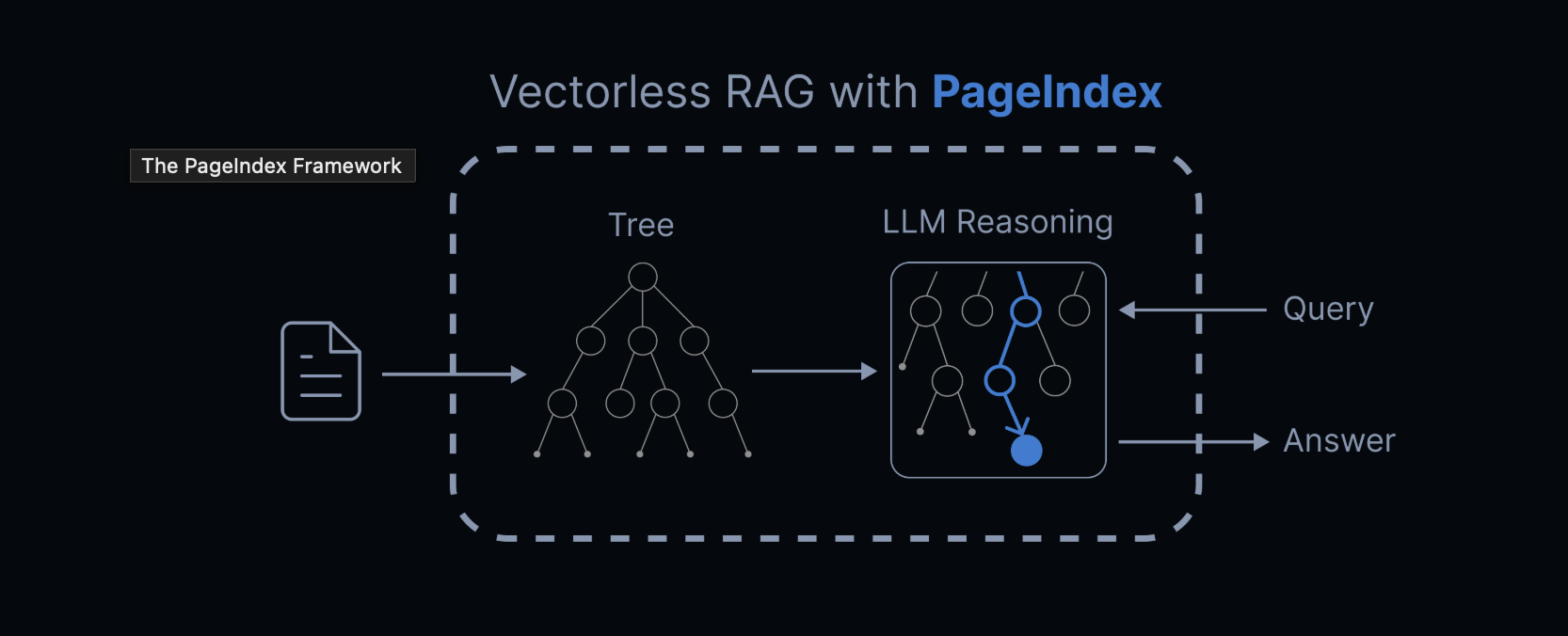
PageIndex là một hệ thống reasoning-based RAG do VectifyAI phát triển. Thay vì dùng vector similarity, nó mô phỏng cách con người tìm kiếm thông tin trong tài liệu dài:
Quy trình hoạt động
-
Tạo chỉ mục phân tầng (Tree Structure Index)
- PageIndex đọc toàn bộ tài liệu
- Tự động tạo "Table of Contents" dạng cây (tree structure)
- Mỗi nhánh cây là một phần logic của tài liệu, không phải chunk ngẫu nhiên
-
Sử dụng Tree Search để tìm kiếm
- Khi bạn hỏi câu hỏi, LLM suy luận từng bước để đi vào nhánh cây đúng
- Giống như con người: đọc mục lục → chọn chương → chọn mục con → đọc nội dung chi tiết
- Transparent — bạn thấy rõ quá trình suy luận, không phải "vibe search"
So sánh: PageIndex vs Vector DB
| Tiêu chí | Vector DB (Traditional RAG) | PageIndex (Reasoning-based) |
|---|---|---|
| Cơ sở tìm kiếm | Similarity (Vibe) | Relevance (Reasoning) |
| Cấu trúc | Chunks ngẫu nhiên | Tree structure (tự nhiên) |
| Xử lý tài liệu dài | Khó, thiếu context | Tốt, có global context |
| Minh bạch | Black box | Clear reasoning path |
| Độ chính xác | ~85-90% (FinanceBench) | 98.7% (FinanceBench) |
| Cần Vector DB? | Có | Không |
| Setup | Phức tạp (DB, embeddings) | Đơn giản (script Python) |
Kết quả thực tế: PageIndex đạt 98.7% accuracy trên FinanceBench — vượt trội so với vector-based RAG truyền thống!
Ưu điểm nổi bật của PageIndex
Không cần Vector Database
Bạn không cần setup Pinecone, Weaviate, Milvus, hoặc bất kỳ vector DB nào. Tiết kiệm chi phí, đơn giản hơn!
Không cần Chunking
Quên đi việc chia nhỏ tài liệu thành 256 token chunks. PageIndex giữ nguyên cấu trúc tài liệu tự nhiên (chương, mục, tiểu mục).
Reasoning-based Retrieval
Thay vì "tìm kiếm theo cảm giác", PageIndex sử dụng suy luận bước-bước của LLM để tìm đúng section. Minh bạch và đáng tin cậy!
Tối ưu cho tài liệu phức tạp
Rất phù hợp cho:
- Báo cáo tài chính (SEC filings, earnings reports)
- Tài liệu pháp lý (hợp đồng, bộ quy tắc)
- Sách giáo khoa & tài liệu kỹ thuật
- Báo cáo phân tích, whitepaper
PageIndex OCR
PageIndex còn có PageIndex OCR — công cụ OCR "thông minh" được thiết kế để bảo tồn cấu trúc tài liệu. Khác với OCR thông thường chỉ trích text từng trang, PageIndex OCR hiểu toàn bộ cấu trúc tài liệu!
Cấu trúc dữ liệu PageIndex Output
Khi chạy PageIndex trên một tài liệu PDF, bạn sẽ nhận được một JSON tree structure như thế này:
{
  "title": "Financial Stability",
  "node_id": "0006",
  "start_index": 21,
  "end_index": 22,
  "summary": "The Federal Reserve monitors and assesses financial vulnerabilities...",
  "nodes": [
    {
      "title": "Monitoring Financial Vulnerabilities",
      "node_id": "0007",
      "start_index": 22,
      "end_index": 28,
      "summary": "The Federal Reserve's monitoring framework includes..."
    },
    {
      "title": "Domestic and International Cooperation",
      "node_id": "0008",
      "start_index": 28,
      "end_index": 31,
      "summary": "In 2023, the Federal Reserve collaborated with..."
    }
  ]
}
Mỗi node là một section logic của tài liệu, với:
- title: Tên section
- node_id: ID duy nhất
- start_index / end_index: Page range
- summary: Tóm tắt nội dung
- nodes: Các sub-section (nested)
Cấu trúc này rất phù hợp để LLM thực hiện tree search reasoning!
Hướng dẫn cài đặt chi tiết
Yêu cầu hệ thống
- Python 3.8+
- OpenAI API key (hoặc model khác hỗ trợ)
- ~500MB disk space
Bước 1: Clone Repository
git clone https://github.com/VectifyAI/PageIndex.git
cd PageIndex
Bước 2: Cài đặt Dependencies
pip3 install --upgrade -r requirements.txt
Bước 3: Set up OpenAI API Key
Tạo file .env trong thư mục root:
# .env
CHATGPT_API_KEY=sk-your_openai_key_here
Hoặc set biến môi trường trực tiếp:
export CHATGPT_API_KEY=sk-your_openai_key_here
Bước 4: Chạy PageIndex
Trên tài liệu PDF:
python3 run_pageindex.py --pdf_path /path/to/your/document.pdf
Hoặc với Markdown file:
python3 run_pageindex.py --md_path /path/to/your/document.md
Các tùy chọn cấu hình
Bạn có thể tùy chỉnh quá trình xử lý bằng các tham số:
python3 run_pageindex.py \
  --pdf_path /path/to/document.pdf \
  --model gpt-4o-2024-11-20 \
  --toc-check-pages 20 \
  --max-pages-per-node 10 \
  --max-tokens-per-node 20000 \
  --if-add-node-id yes \
  --if-add-node-summary yes \
  --if-add-doc-description yes
| Tham số | Mô tả | Giá trị mặc định |
|---|---|---|
--model |
OpenAI model sử dụng | gpt-4o-2024-11-20 |
--toc-check-pages |
Số trang để detect table of contents | 20 |
--max-pages-per-node |
Max trang mỗi node | 10 |
--max-tokens-per-node |
Max tokens mỗi node | 20000 |
--if-add-node-id |
Thêm node ID (yes/no) | yes |
--if-add-node-summary |
Thêm node summary (yes/no) | yes |
--if-add-doc-description |
Thêm mô tả tài liệu (yes/no) | yes |
Quick Start: Sử dụng PageIndex trong Code
Sau khi cài đặt, bạn có thể sử dụng PageIndex trong Python code của mình:
from pageindex import PageIndex

# Khởi tạo PageIndex
indexer = PageIndex(
    api_key="sk-your_openai_key_here",
    model="gpt-4o-2024-11-20"
)

# Tạo tree structure từ PDF
tree = indexer.create_index_from_pdf(
    pdf_path="path/to/document.pdf",
    max_pages_per_node=10,
    max_tokens_per_node=20000
)

# Lưu tree vào JSON
import json
with open("document_tree.json", "w") as f:
    json.dump(tree, f, indent=2)

print("✓ Tree structure created!")
print(json.dumps(tree, indent=2)[:500] + "...")
Output:
✓ Tree structure created!
{
  "title": "Your Document Title",
  "node_id": "0001",
  "start_index": 1,
  "end_index": 150,
  "summary": "This document discusses...",
  "nodes": [...]
}
Ví dụ sử dụng: Tree Search RAG
Dưới đây là cách sử dụng tree structure để thực hiện reasoning-based retrieval:
import json
import openai

# Load tree structure
with open("document_tree.json", "r") as f:
    doc_tree = json.load(f)

# Hàm tree search
def tree_search(query, node, depth=0):
    """Tìm kiếm node liên quan nhất bằng reasoning"""
    prompt = f"""
    Given this query: "{query}"

    Which of these sections is most relevant?
    - {node['title']} (summary: {node['summary']})

    Child sections:
    {json.dumps([{"title": n['title'], "summary": n['summary']} for n in node.get('nodes', [])], indent=2)}

    Respond with the node title or "THIS_NODE" if current node is most relevant.
    """

    response = openai.ChatCompletion.create(
        model="gpt-4o-2024-11-20",
        messages=[{"role": "user", "content": prompt}]
    )

    decision = response['choices'][0]['message']['content'].strip()

    if decision == "THIS_NODE":
        return node
    else:
        for child in node.get('nodes', []):
            if child['title'] in decision:
                return tree_search(query, child, depth + 1)
        return node

# Thực hiện tìm kiếm
relevant_section = tree_search("What about financial stability?", doc_tree)
print(f"📍Found relevant section: {relevant_section['title']}")
print(f"📄 Summary: {relevant_section['summary']}")
Kết quả:
📍 Found relevant section: Financial Stability
📄 Summary: The Federal Reserve monitors...
Trường hợp sử dụng thực tế
Chatbot phân tích báo cáo tài chính
Xây dựng chatbot tự động trích xuất dữ liệu từ báo cáo tài chính (10A, 10K files) với độ chính xác 98.7%!
# Tải báo cáo tài chính
report = load_pdf("SEC_10K_Report.pdf")
tree = indexer.create_index_from_pdf(report)

# User hỏi
user_query = "Revenue từ Asia-Pacific region trong Q3 là bao nhiêu?"

# Tree search
relevant_section = tree_search(user_query, tree)
answer = extract_answer(relevant_section, user_query)
Legal Document Assistant
Giúp luật sư tìm kiếm các mệnh đề liên quan trong hợp đồng hoặc bộ quy tắc:
contract_tree = indexer.create_index_from_pdf("contract.pdf")
query = "Điều khoản về liability limitation?"
relevant = tree_search(query, contract_tree)
Knowledge Base Search
Tạo search engine cho các tài liệu nội bộ công ty:
# Index tất cả internal docs
for doc_path in company_docs:
    tree = indexer.create_index_from_pdf(doc_path)
    save_tree(tree, f"{doc_path}.tree.json")

# Search
query = "Chính sách nghỉ phép?"
results = search_all_trees(query)
Benchmark: PageIndex vs Vector DB
Theo bài viết chính thức của VectifyAI trên FinanceBench:
| Method | Accuracy | Notes |
|---|---|---|
| PageIndex | 98.7% | Reasoning-based, tree search |
| Traditional Vector RAG | ~85-90% | Semantic similarity |
| Traditional Keyword Search | ~70-80% | Không hiểu semantic |
PageIndex vượt trội nhất là trên tài liệu dài và phức tạp yêu cầu domain expertise — chính xác là những tài liệu mà vector DB thường gặp khó khăn!
PageIndex MCP: Tích hợp với Claude, Cursor, và Agents
Ngoài ra, PageIndex còn phát triển PageIndex MCP (Model Context Protocol), cho phép bạn dùng PageIndex trực tiếp trong:
- Claude (Anthropic)
- Cursor (IDE AI-powered)
- Bất kỳ MCP-enabled agent nào
Chỉ cần chat với tài liệu PDF dài mà không cần load toàn bộ vào context!
Đánh giá cá nhân
Ưu điểm
- Chính xác cao — 98.7% trên benchmark chuyên môn
- Setup đơn giản — Chỉ cần Python + API key
- Không cần vector DB — Tiết kiệm infrastructure complexity
- Reasoning transparent — Thấy rõ quá trình suy luận
- Tối ưu cho tài liệu dài — Giữ nguyên cấu trúc tự nhiên
- Mã nguồn mở — Có thể tùy chỉnh theo nhu cầu
Nhược điểm
- Phụ thuộc API — Cần OpenAI/Claude API key + chi phí token (khắc phục bằng cách sử dụng CLIProxy cho ae nào chưa biết)
- Không completely free — Bạn phải trả token cho LLM (tuy rẻ hơn vector DB)
- Tài liệu có chất lượng — Nếu PDF có OCR kém, tree structure cũng không tốt (giải quyết bằng PageIndex OCR)
- Chậm hơn vector search — Vì cần suy luận bước-bước (acceptable trade-off)
PageIndex là game changer cho bất kỳ ai xây dựng RAG system trên tài liệu chuyên môn dài. Thay vì lăn lộn với vector chunking, bạn có thể focus vào relevance và reasoning. Mình strongly recommend để try nếu bạn:
- Đang xây dựng chatbot/agent trên documents
- Chán vector DB complexity
- Cần độ chính xác cao trên tài liệu phức tạp
- Muốn retrieval process minh bạch & đáng tin cậy
Nguồn tài liệu chính chủ cho anh em ngâm cứu thêm
- GitHub Repository: VectifyAI/PageIndex
- Trang Chính thức: pageindex.ai
- Dashboard: cloud.pageindex.ai
- Discord Cộng đồng: VectifyAI Discord
-
Tutorials & Cookbook: Check GitHub
/docsfolder - API Documentation: docs.pageindex.ai
P/S: Nếu bạn nào cũng đang explore reasoning-based AI (Claude o1, DeepSeek-R1), PageIndex là perfect match! Vừa reasoning models mạnh, vừa need proper retrieval — PageIndex provides exactly that!

Top comments (0)